Exporting an Automatic Transcription to PRAAT TextGrid or ELAN File
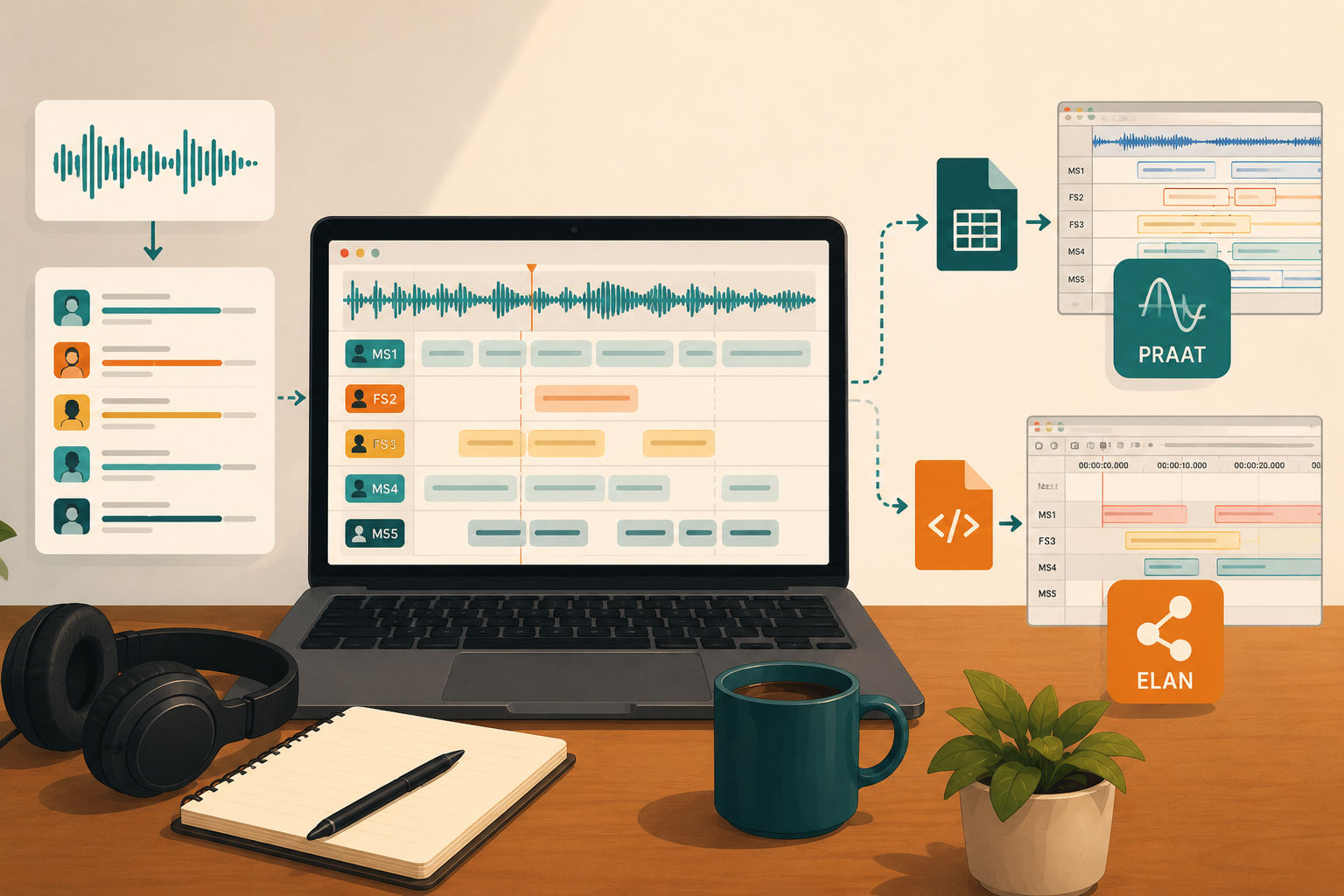
Exporting an Automatic Transcription to PRAAT TextGrid or ELAN File
Manual transcription is usually the first step of any oral corpus project, and almost always the slowest one. Before you can start phonetic annotation in PRAAT or discourse annotation in ELAN, you need the text already aligned to the signal. Depending on audio quality and the number of speakers, this preliminary work can take several hours per hour of recording.
YobiYoba automates that first step. The service transcribes the audio, identifies speakers, aligns each segment to the signal, then exports directly to TextGrid format for PRAAT or .eaf format for ELAN. You get a ready-to-open file with tiers already structured.
What YobiYoba Produces Before the Export
The automatic transcription generates a structured document containing, for each speech segment:
- the identified speaker (automatic diarisation, with estimated gender)
- start and end timestamps for the segment
- the transcribed text, with per-word timestamps and confidence scores
- the detected language
This structure is what allows YobiYoba to produce coherent PRAAT and ELAN files, with one tier per speaker and intervals precisely aligned to the audio.
Before exporting, you can review and correct the transcription in the built-in editor. This is the right moment to check proper nouns, technical terms, and low-intelligibility passages. You can also manually anonymise sensitive segments if the recording contains personal data.
To start the export, go to My files, click "Download transcription" for the file you want, then choose the format: PRAAT (TextGrid) or ELAN (.eaf).
Exporting to PRAAT TextGrid
PRAAT uses the TextGrid format for temporal annotations. A TextGrid is made up of tiers, each covering the full duration of the signal. YobiYoba generates one IntervalTier per detected speaker. Each tier is named after the speaker identifier (MS1, FS3, etc.) and contains speech segments as annotated intervals, with empty intervals between turns.
Example TextGrid produced by YobiYoba for a 45-second recording with 3 speakers:
File type = "ooTextFile"
Object class = "TextGrid"

xmin = 2.14
xmax = 45
tiers? <exists>
size = 3
item []:
    item [1]:
        class = "IntervalTier"
        name = "MS1"
        xmin = 2.14
        xmax = 45
        intervals: size = 4
        intervals [1]:
            xmin = 2.14
            xmax = 9.80
            text = " We have been working on this project for two years. The original idea was to improve access to local records."
        intervals [2]:
            xmin = 9.80
            xmax = 12.40
            text = ""
        intervals [3]:
            xmin = 12.40
            xmax = 16.22
            text = " Right. We had to rethink the whole setup from March onwards."
        intervals [4]:
            xmin = 16.22
            xmax = 45
            text = ""
    item [2]:
        class = "IntervalTier"
        name = "FS1"
        xmin = 2.14
        xmax = 45
        intervals: size = 3
        intervals [1]:
            xmin = 2.14
            xmax = 10.30
            text = ""
        intervals [2]:
            xmin = 10.30
            xmax = 11.80
            text = " Yes, exactly. And it evolved quite quickly from the first year."
        intervals [3]:
            xmin = 11.80
            xmax = 45
            text = ""
    item [3]:
        class = "IntervalTier"
        name = "MS2"
        xmin = 2.14
        xmax = 45
        intervals: size = 3
        intervals [1]:
            xmin = 2.14
            xmax = 17.50
            text = ""
        intervals [2]:
            xmin = 17.50
            xmax = 22.10
            text = " As for me, I joined the project midway through, last January."
        intervals [3]:
            xmin = 22.10
            xmax = 45
            text = ""
A few things to note about this format:
The xmin of the TextGrid corresponds to the beginning of the first detected segment, not necessarily to 0. The xmax corresponds to the total duration of the audio signal. Empty intervals (text = "") fill the silences between each speaker's turns. This is the standard structure expected by PRAAT for an IntervalTier.
Once the file is open in PRAAT, you can rename the tiers (MS1, FS3...) with the actual first names or pseudonyms of the speakers. You can also add new tiers: phonemes, prosody, event labels, field notes.
Exporting to ELAN File
ELAN uses the .eaf format (ELAN Annotation Format), an XML conforming to the MPI schema. YobiYoba produces an EAFv3.0 file with one TIER per speaker, aligned to the audio file via the media URL.
Example .eaf structure produced by YobiYoba:
<?xml version="1.0" encoding="UTF-8"?>
<ANNOTATION_DOCUMENT FORMAT="3.0" VERSION="3.0"
  xmlns:xsi="http://www.w3.org/2001/XMLSchema-instance"
  xsi:noNamespaceSchemaLocation="http://www.mpi.nl/tools/elan/EAFv3.0.xsd">
  <HEADER MEDIA_FILE="" TIME_UNITS="milliseconds">
    <MEDIA_DESCRIPTOR MEDIA_URL="file:///interview.wav" MIME_TYPE="audio/x-wav"/>
  </HEADER>
  <TIME_ORDER>
    <TIME_SLOT TIME_SLOT_ID="ts1" TIME_VALUE="2140"/>
    <TIME_SLOT TIME_SLOT_ID="ts2" TIME_VALUE="9800"/>
    <TIME_SLOT TIME_SLOT_ID="ts3" TIME_VALUE="10300"/>
    <TIME_SLOT TIME_SLOT_ID="ts4" TIME_VALUE="11800"/>
    <TIME_SLOT TIME_SLOT_ID="ts5" TIME_VALUE="12400"/>
    <TIME_SLOT TIME_SLOT_ID="ts6" TIME_VALUE="16220"/>
    <TIME_SLOT TIME_SLOT_ID="ts7" TIME_VALUE="17500"/>
    <TIME_SLOT TIME_SLOT_ID="ts8" TIME_VALUE="22100"/>
  </TIME_ORDER>
  <TIER LINGUISTIC_TYPE_REF="default-lt" PARTICIPANT="MS1" TIER_ID="MS1">
    <ANNOTATION>
      <ALIGNABLE_ANNOTATION ANNOTATION_ID="a1"
        TIME_SLOT_REF1="ts1" TIME_SLOT_REF2="ts2">
        <ANNOTATION_VALUE> We have been working on this project for two years. The original idea was to improve access to local records.</ANNOTATION_VALUE>
      </ALIGNABLE_ANNOTATION>
    </ANNOTATION>
    <ANNOTATION>
      <ALIGNABLE_ANNOTATION ANNOTATION_ID="a3"
        TIME_SLOT_REF1="ts5" TIME_SLOT_REF2="ts6">
        <ANNOTATION_VALUE> Right. We had to rethink the whole setup from March onwards.</ANNOTATION_VALUE>
      </ALIGNABLE_ANNOTATION>
    </ANNOTATION>
  </TIER>
  <TIER LINGUISTIC_TYPE_REF="default-lt" PARTICIPANT="FS1" TIER_ID="FS1">
    <ANNOTATION>
      <ALIGNABLE_ANNOTATION ANNOTATION_ID="a2"
        TIME_SLOT_REF1="ts3" TIME_SLOT_REF2="ts4">
        <ANNOTATION_VALUE> Yes, exactly. And it evolved quite quickly from the first year.</ANNOTATION_VALUE>
      </ALIGNABLE_ANNOTATION>
    </ANNOTATION>
  </TIER>
  <TIER LINGUISTIC_TYPE_REF="default-lt" PARTICIPANT="MS2" TIER_ID="MS2">
    <ANNOTATION>
      <ALIGNABLE_ANNOTATION ANNOTATION_ID="a4"
        TIME_SLOT_REF1="ts7" TIME_SLOT_REF2="ts8">
        <ANNOTATION_VALUE> As for me, I joined the project midway through, last January.</ANNOTATION_VALUE>
      </ALIGNABLE_ANNOTATION>
    </ANNOTATION>
  </TIER>
  <LINGUISTIC_TYPE GRAPHIC_REFERENCES="false"
    LINGUISTIC_TYPE_ID="default-lt" TIME_ALIGNABLE="true"/>
</ANNOTATION_DOCUMENT>
Times are in milliseconds (unlike the PRAAT TextGrid which uses seconds). The MEDIA_URL field points to the local audio file: remember to update this path if you move the .eaf file to a different machine or shared server.
In ELAN, you can then add child tiers under each speaker tier: translations, glosses, comments, turn-taking labels. ELAN also supports linking annotations to a video track if your recording includes one.
What You Can Do Next
In PRAAT: Each speaker tier is a starting point, not a final result. You can add phonetic transcription tiers, prosodic tiers (F0, intensity), or labels for para-verbal events (laughter, overlaps, pauses). Word-level timing precision is available in the raw YobiYoba data if you need to go further.
In ELAN: The generated .eaf file complies with the MPI structure. You can import it directly into an existing ELAN project, add custom linguistic types, controlled vocabularies, or share it with collaborators via IMDI or CMDI.
For large corpora: If you are processing tens or hundreds of files, the YobiYoba API lets you automate the full pipeline: send audio, retrieve the XML, convert to TextGrid or .eaf by script. This avoids going through the interface manually for each recording.
What Automatic Transcription Does Not Replace
Diarisation assigns automatic identifiers to speakers (MS1, FS3, etc. based on estimated gender). These identifiers need to be renamed according to your own coding system. On recordings with heavy overlapping speech or background noise, there may be turn attribution errors: a review is still necessary before any quantitative analysis.
Transcription is produced at the speech segment level. Word-level timestamps are available in the source XML, but the TextGrid and ELAN exports work at segment granularity. If your research requires phoneme-by-phoneme or word-by-word alignment in PRAAT, a forced alignment step is still needed downstream (for example using EasyAlign or the Montreal Forced Aligner).
What YobiYoba automates is the most time-consuming layer: going from a raw signal to an annotated document, speaker by speaker, aligned to the timeline. The rest of the annotation work remains yours.